Getting started
To integrate 1Password SaaS Manager with Talkdesk you’ll need to set up an OAuth Client in Talkdesk.
To do this, login to Builder.
Note
If you don’t see the OAuth Client option, then you may need to contact Talkdesk’s support team.
In your message you should write:
We are wanting to connect to the Talkdesk API using Client Credentials authentication. Your documentation (https://docs.talkdesk.com/docs/creating-a-new-oauth-client) says that you can enable the OAuth clients option in Builder if we raise a ticket
Specific points on each step
The Talkdesk help article is deliberately generic and there are some specific settings required to get SaaS Manager to connect:
Step 3
Only check Client Credentials under Grant type (and not Refresh token, or Authorization code). With that selection made you should not be required to provide a Redirect URL.
Step 4
Check the scopes data-reports:read and users:read
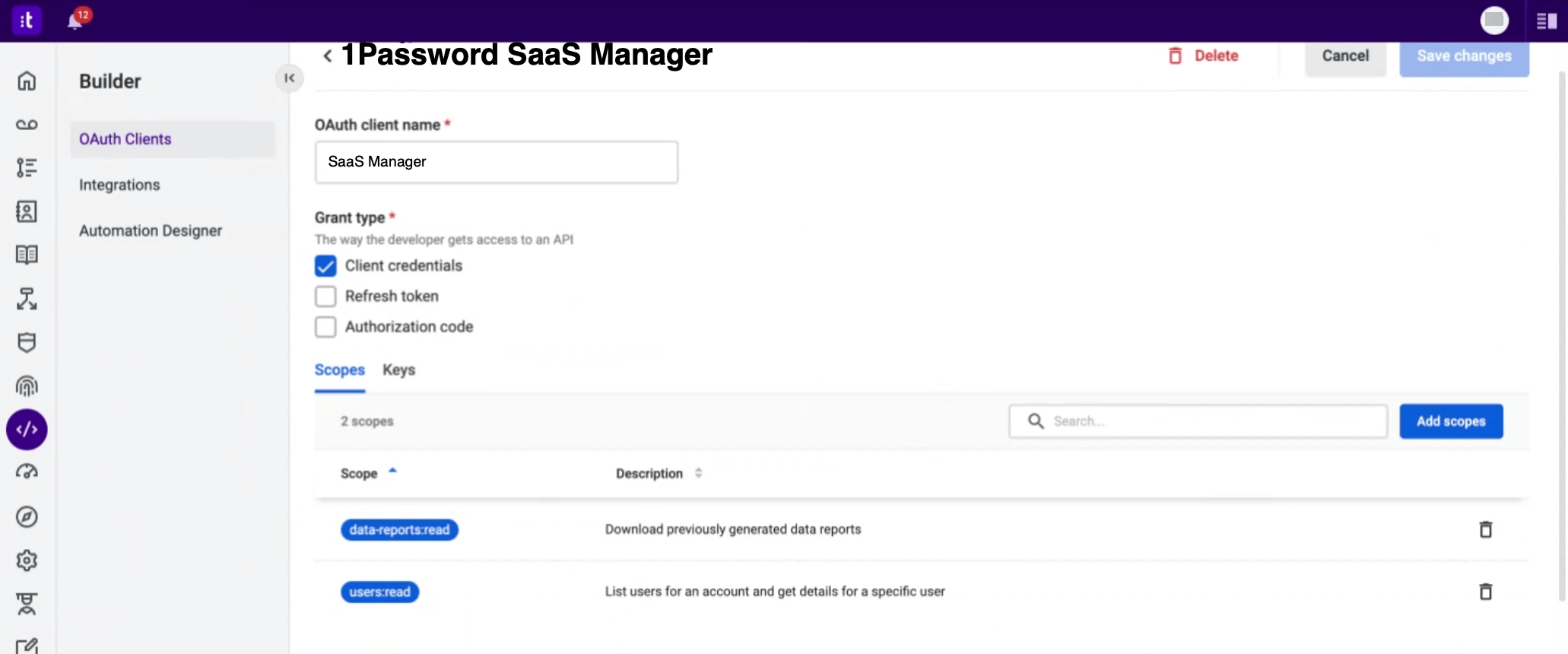
Step 5
Copy the Client ID and Client Secret. You’ll need these to configure the SaaS Manager integration (along with the Talkdesk account name you used to login to Talkdesk Builder).
Was this article helpful?
Glad to hear it! If you have anything you'd like to add, feel free to contact us.
Sorry to hear that. Please contact us if you'd like to provide more details.