Connecting to Sapling from 1Password SaaS Manager
Depending on where your Sapling data is hosted, SaaS Manager expects you to input an Application URL in the following format:
| Sapling data center | Application URL |
|---|---|
| US | https://{{subdomain}}.saplingapp.io |
| UK | https://{{subdomain}}.kallidus-suite.com/hr |
Where {{subdomain}} should be replaced with your company’s subdomain, for example yourcompany.
Creating an API key in Sapling
Log in to Sapling and navigate to Integrations > API Keys, followed by clicking Create new key.
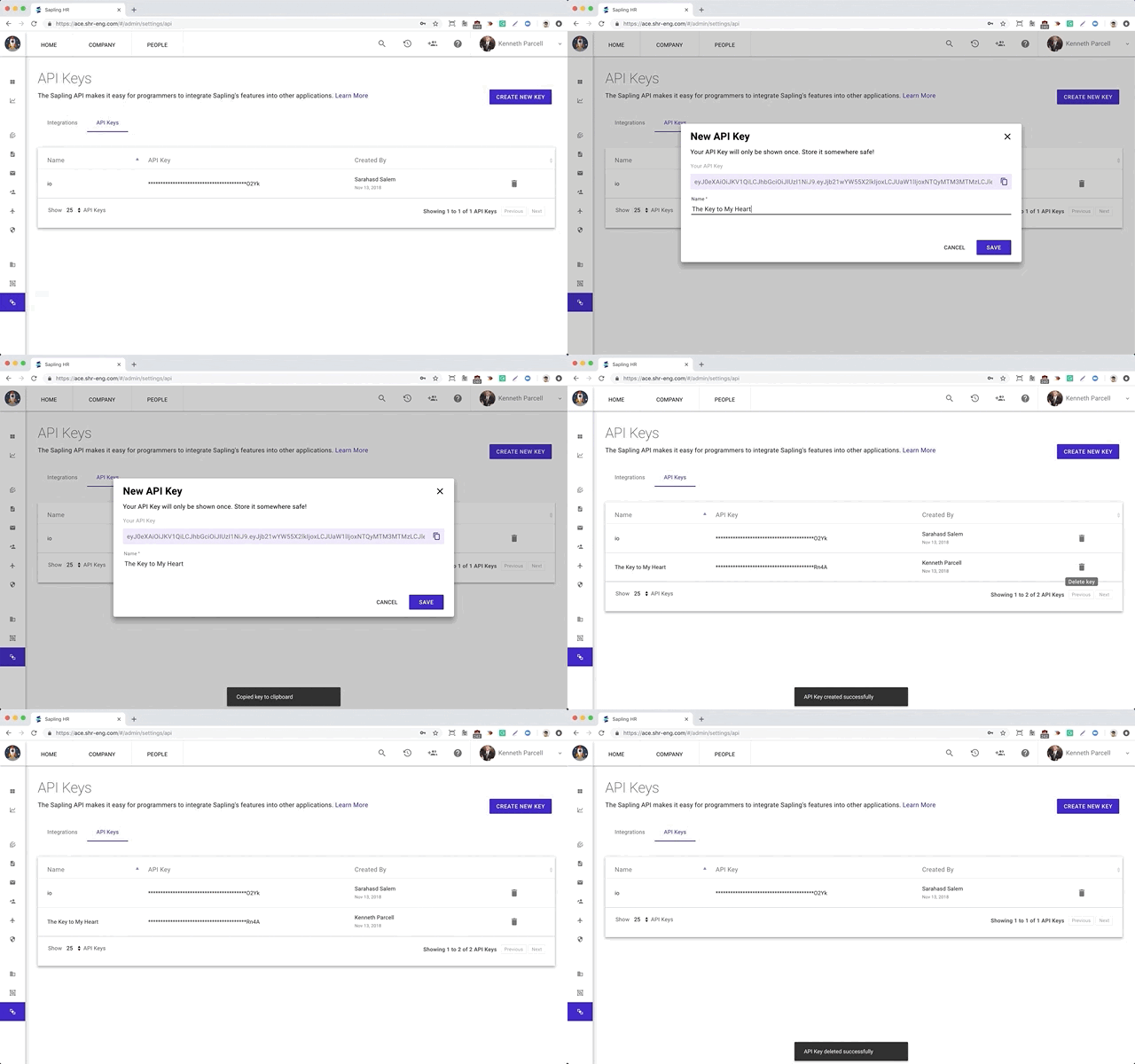
Provide a sensible Name for the API key, for example 1Password SaaS Manager.
Copy the API key to your clipboard (as you’ll need to input it in SaaS Manager) before clicking Save.
Was this article helpful?
Glad to hear it! If you have anything you'd like to add, feel free to contact us.
Sorry to hear that. Please contact us if you'd like to provide more details.