Log in to Coupa as an ‘integrations enabled’ administrator and go to: Setup > Oauth2/OpenID Connect Clients.
Note
Click Create.
For Grant Type select: Client credentials.
Specify a Name for the Client (we recommend ‘SaaS Manager integration’).
Enter Login, Contact info, and Contact Email. Login is just text (you can enter ‘Client’). The contact details are simply so that other Coupa administrators know who configured the connection, so we recommend entering your name and email.
Select the following Scopes:
core.business_entity.readcore.common.readcore.user.readcore.user_group.readcore.requisition.readcore.purchase_order.readcore.supplier.readoffline_access
Click Save.
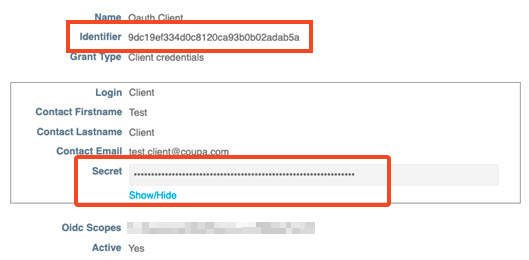
Saving the client gives you values of the client Identifier and Secret which you will need to enter into 1Password SaaS Manager.
Click Show/Hide to display and copy the Secret.
Was this article helpful?
Glad to hear it! If you have anything you'd like to add, feel free to contact us.
Sorry to hear that. Please contact us if you'd like to provide more details.