Note
Granting full disk access permissions
The Kolide agent needs Full Disk Access (FDA) to improve the accuracy and better inspect the system to understand the security of the device. If your organization uses MDM to manage its Macs, we have prepared a custom configuration profile that you can distribute, which will grant the Kolide agent the correct permissions.
You should consult your MDM provider’s documentation on how to correctly
add the SystemPolicyAllFiles permissions for an app. This information should
help you craft a profile.
Tip
Profile Versions
As a heads up, the version of the profile you need depends on what version of the Kolide agent you originally installed. This is because the FDA permission is inherited from what the macOS launchd starts, and not what the agent has updated to.
If you need assistance with these changes, reach out to Support.
Agent versions 0.13 and later (includes 1.0)
This covers all agents since version 0.13, first released in December 2022. Be aware that if you’re using an MDM to distribute packages, you may have an older version being installed.
Key Information:
- Identifier Type -
bundleID - Identifier -
com.kolide.agent - CodeRequirement -
identifier "com.kolide.agent" and anchor apple generic and certificate 1[field.1.2.840.113635.100.6.2.6] /* exists */ and certificate leaf[field.1.2.840.113635.100.6.1.13] /* exists */ and certificate leaf[subject.OU] = X98UFR7HA3
Example Profile:
<key>Services</key>
<dict>
    <key>SystemPolicyAllFiles</key>
    <array>
        <dict>
            <key>Allowed</key>
            <true />
            <key>CodeRequirement</key>
            <string>identifier "com.kolide.agent" and anchor apple generic and
            certificate 1[field.1.2.840.113635.100.6.2.6] /* exists */
            and certificate leaf[field.1.2.840.113635.100.6.1.13] /* exists */
            and certificate leaf[subject.OU] = X98UFR7HA3</string>
            <key>Comment</key>
            <string>Allow kolide access to device and user level files</string>
            <key>Identifier</key>
            <string>com.kolide.agent</string>
            <key>IdentifierType</key>
            <string>bundleID</string>
        </dict>
    </array>
</dict>
Agent versions 0.12 and below
Key Information:
- Identifier Type -
path - Identifier -
/usr/local/kolide-k2/bin/launcher - CodeRequirement -
identifier launcher and anchor apple generic and certificate 1[field.1.2.840.113635.100.6.2.6] /* exists */ and certificate leaf[field.1.2.840.113635.100.6.1.13] /* exists */ and certificate leaf[subject.OU] = YZ3EM74M78
Example Profile:
<key>Services</key>
<dict>
    <key>SystemPolicyAllFiles</key>
    <array>
        <dict>
            <key>Allowed</key>
            <true />
            <key>CodeRequirement</key>
            <string>identifier launcher and anchor apple generic and certificate 1[field.1.2.840.113635.100.6.2.6] /* exists */ and certificate leaf[field.1.2.840.113635.100.6.1.13] /* exists */ and certificate leaf[subject.OU] = YZ3EM74M78</string>
            <key>Comment</key>
            <string>Allow kolide access to device and user level files</string>
            <key>Identifier</key>
            <string>/usr/local/kolide-k2/bin/launcher</string>
            <key>IdentifierType</key>
            <string>path</string>
        </dict>
    </array>
</dict>
Enable Kolide’s menubar app notifications
The Kolide agent contains a menubar app that displays notifications to the end-user when their device’s authentication state changes. When the app first appears, users may be prompted to allow notifications. If they dismiss this request, they may miss critical notifications from the system.
The following MDM profile can be deployed to the Mac fleet as an easy way to make sure Kolide menu bar app notifications are always enabled and visible to end-users.
Important
<?xml version="1.0" encoding="UTF-8"?>
<!DOCTYPE plist PUBLIC "-//Apple//DTD PLIST 1.0//EN" "http://www.apple.com/DTDs/PropertyList-1.0.dtd">
<plist version="1.0">
<dict>
	<key>PayloadContent</key>
	<array>
		<dict>
			<key>NotificationSettings</key>
			<array>
				<dict>
					<key>BundleIdentifier</key>
					<string>com.kolide.agent</string>
					<key>CriticalAlertEnabled</key>
					<true/>
					<key>PreviewType</key>
					<integer>1</integer>
				</dict>
			</array>
			<key>PayloadDescription</key>
			<string>Configures notifications settings for apps</string>
			<key>PayloadDisplayName</key>
			<string>Notifications</string>
			<key>PayloadIdentifier</key>
			<string>com.apple.notificationsettings.B59EADBB-46D3-4368-B905-52D222FBCB27</string>
			<key>PayloadType</key>
			<string>com.apple.notificationsettings</string>
			<key>PayloadUUID</key>
			<string>B59EADBB-46D3-4368-B905-52D222FBCB27</string>
			<key>PayloadVersion</key>
			<integer>1</integer>
		</dict>
	</array>
	<key>PayloadDisplayName</key>
	<string>Kolide Agent</string>
	<key>PayloadIdentifier</key>
	<string>com.kolide.agent</string>
	<key>PayloadOrganization</key>
	<string>Kolide</string>
	<key>PayloadRemovalDisallowed</key>
	<true/>
	<key>PayloadType</key>
	<string>Configuration</string>
	<key>PayloadUUID</key>
	<string>3ADA839E-DA1E-41F5-95DC-B6A78B3E8D97</string>
	<key>PayloadVersion</key>
	<integer>1</integer>
</dict>
</plist>
Suppress background task notifications for silent installation
Many organizations choose to roll out the Kolide agent in Silent Mode where the menu bar app is initially hidden. Contact 1Password Device Trust support if you’re interested in this feature. Silent Mode has to be turned on by 1Password and can’t be turned on by your organization directly.
Starting in macOS 13 (Ventura), Apple has introduced a new style of notification that informs users when the Kolide agent’s Launch Daemon is installed.
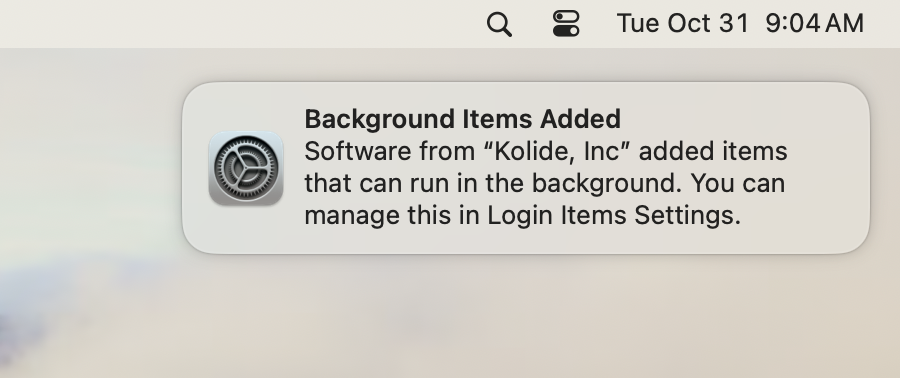
To suppress these notifications for a truly silent installation experience, the following MDM profile can be deployed to your Mac fleet. Keep in mind, this profile will suppress all notifications of this type, so you may wish to remove it later.
Important
<?xml version="1.0" encoding="UTF-8"?>
<!DOCTYPE plist PUBLIC "-//Apple//DTD PLIST 1.0//EN" "http://www.apple.com/DTDs/PropertyList-1.0.dtd">
<plist version="1.0">
<dict>
	<key>PayloadContent</key>
	<array>
		<dict>
			<key>NotificationSettings</key>
			<array>
				<dict>
					<key>BundleIdentifier</key>
					<string>com.apple.BTMNotificationAgent</string>
					<key>NotificationsEnabled</key>
					<false/>
				</dict>
			</array>
			<key>PayloadIdentifier</key>
			<string>com.apple.notificationsettings.12c05d0d-6231-4621-9ac6-a781a626951b</string>
			<key>PayloadType</key>
			<string>com.apple.notificationsettings</string>
			<key>PayloadUUID</key>
			<string>12c05d0d-6231-4621-9ac6-a781a626951b</string>
			<key>PayloadVersion</key>
			<integer>1</integer>
		</dict>
	</array>
	<key>PayloadDescription</key>
	<string>Disable Background Task Management Notifications</string>
	<key>PayloadDisplayName</key>
	<string>Disable Background Task Management Notifications</string>
	<key>PayloadIdentifier</key>
	<string>com.apple.notificationsettings.5ea4543d-f0fe-4f19-9e5f-7fab2051b712</string>
	<key>PayloadScope</key>
	<string>System</string>
	<key>PayloadType</key>
	<string>Configuration</string>
	<key>PayloadUUID</key>
	<string>5ea4543d-f0fe-4f19-9e5f-7fab2051b712</string>
	<key>PayloadVersion</key>
	<integer>1</integer>
</dict>
</plist>
Was this article helpful?
Glad to hear it! If you have anything you'd like to add, feel free to contact us.
Sorry to hear that. Please contact us if you'd like to provide more details.